Anyone Can Vibe Code. But Can Anyone Build Software That Scales?
Vibe coding removed the coding barrier. But without understanding the database, server, storage, and auth layers underneath, your app will break the moment it meets real users at real scale.
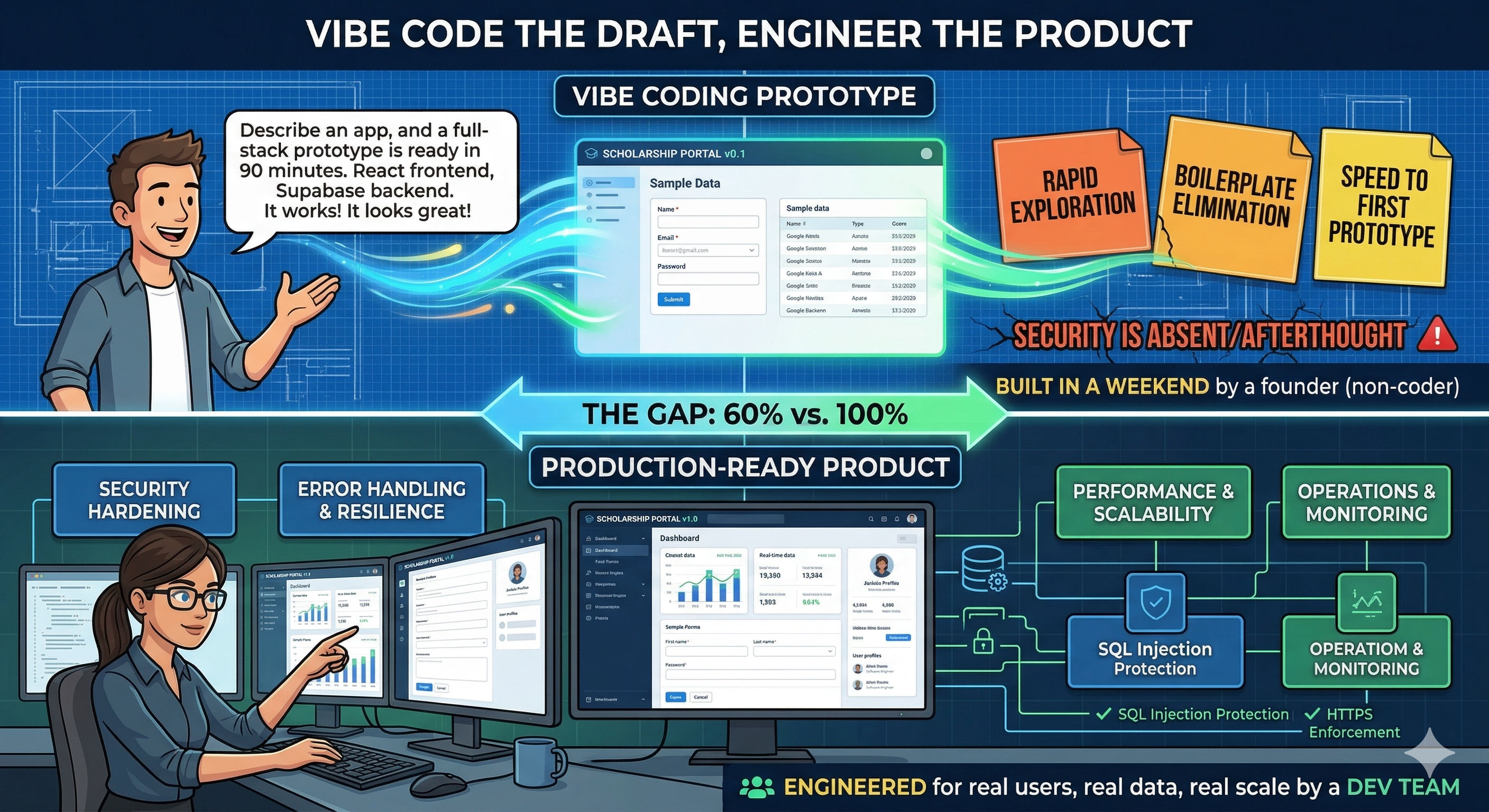
Yes, anyone can vibe code. A founder describes an app in plain English, and Lovable generates a full-stack prototype with a React frontend and a Supabase backend in 90 minutes. It works. It looks great. Then the founder asks: "Can this handle 10,000 users?" And nobody in the room knows the answer — because nobody in the room understands what "Supabase backend" actually means under the hood.
The core problem: Vibe coding tools have made it trivially easy to create software. But they've also made it dangerously easy to skip understanding the stack your software runs on. Without knowing how your database, server, storage, and infrastructure actually work, you can build an app — but you cannot build one that scales, stays secure, or survives real-world production.
In This Post
- The vibe coding paradox
- The software stack nobody talks about
- Database: the foundation everything breaks on
- Server and compute: where your app actually runs
- Storage: files, images, and the costs nobody expects
- Authentication and security: the layer you can't vibe
- The full stack comparison: what vibe coding gives you vs what production needs
- The scaling wall: what breaks at 100, 1,000, and 10,000 users
- How to close the gap without becoming a full-time engineer
- The bottom line
The Vibe Coding Paradox
Vibe coding has democratised software creation in a way that felt impossible two years ago. Collins Dictionary made it Word of the Year. 92% of US developers now use AI coding tools daily. 25% of Y Combinator's Winter 2025 startups reported codebases that were 95% AI-generated. Solo founders are shipping apps in weekends that used to take months and entire teams.
The paradox is this: the easier it becomes to create software, the harder it becomes to know if that software is built on solid ground. When you write code manually, you're forced to make infrastructure decisions — which database, what server, how authentication works, where files are stored. When AI generates code for you, those decisions are still being made. You just don't see them. And what you don't see, you can't evaluate, debug, or scale.
I've built production workflows on Supabase + React + Vercel for enterprise clients. I've also vibe coded prototypes on Lovable, Bolt, Emergent, and Claude Artifacts. The prototypes that turned into real products had one thing in common: at some point, someone on the team understood the stack. The ones that failed had one thing in common too: nobody did.
This post isn't about whether vibe coding works. It works. It's about why understanding the software stack underneath your vibe-coded app is the difference between something that demos well and something that actually scales.
The Software Stack Nobody Talks About
Every application — whether you built it with Claude Code in a terminal or described it in plain English on Lovable — runs on the same fundamental layers. Vibe coding tools abstract these layers away. That's their value. But abstraction isn't elimination. The layers are still there, and when something breaks, the abstraction is the first thing that disappears.
Here's what's actually running under every vibe-coded app:
| Layer | What It Does | What Vibe Coding Tools Use | What You Need to Understand |
|---|---|---|---|
| Database | Stores all your application data — users, records, relationships | Supabase (PostgreSQL), Firebase (Firestore), Neon, PlanetScale | Table design, indexing, queries, row-level security, connection limits |
| Server / Compute | Runs your application logic, handles API requests | Vercel (serverless), Netlify, Supabase Edge Functions, Cloud Run | Cold starts, execution limits, timeout handling, stateless vs stateful |
| Storage | Holds files — images, documents, uploads | Supabase Storage, AWS S3, Cloudflare R2 | Bucket policies, file size limits, CDN caching, cost scaling |
| Authentication | Controls who can access what | Supabase Auth, Firebase Auth, Auth0, Clerk | Token management, session handling, role-based access, OAuth flows |
| Networking / CDN | Delivers your app to users globally | Vercel Edge Network, Cloudflare, AWS CloudFront | Caching rules, CORS, SSL/TLS, latency optimization |
| DNS / Domain | Maps your domain name to your app | Vercel, Netlify, Cloudflare DNS | Propagation, SSL certificates, subdomain routing |
When Lovable builds you an app with "a Supabase backend," it's making decisions in every one of these layers. The question is: do you know what those decisions are?
Database: The Foundation Everything Breaks On
The database is where 80% of scaling problems originate. And it's the layer that vibe coding tools handle most poorly at scale.
What Vibe Coding Gets Right
AI tools are genuinely good at generating basic database schemas. Describe a "school management system with students, classes, and teachers" and Supabase will get a reasonable table structure with foreign keys and basic relationships. For prototyping, this is perfect.
What Vibe Coding Gets Wrong
No indexing strategy. The AI creates tables but rarely creates indexes. With 50 rows, this doesn't matter — every query is fast. With 50,000 rows, an unindexed query on a frequently filtered column becomes the reason your app feels slow. Users don't know what "missing database index" means. They just know the app takes 8 seconds to load.
No query optimization. AI-generated code often fetches more data than needed — selecting all columns when only three are required, loading entire tables when pagination would suffice, running N+1 queries inside loops without realising it. These patterns are invisible at prototype scale and devastating at production scale.
Row-Level Security is often missing or misconfigured. Supabase RLS is the mechanism that controls which users can see which rows in your database. Without it, every authenticated user can read and write every row in every table. I've reviewed vibe-coded apps where RLS was completely disabled — the app worked perfectly in the demo and would have exposed every user's data in production.
Connection pooling isn't considered. PostgreSQL has a finite number of simultaneous connections. Supabase provides connection pooling through Supavisor, but the AI-generated code often connects directly to the database instead of through the pooler. At 10 concurrent users, this works fine. At 100, you start hitting connection limits. At 500, the database stops accepting new connections.
| Database Concept | Why It Matters | What Happens Without It |
|---|---|---|
| Indexes | Speed up queries on frequently filtered columns | Pages load in 8 seconds instead of 200 milliseconds |
| Connection pooling | Manages simultaneous database connections | App crashes when concurrent users exceed connection limit |
| Row-Level Security | Controls which users see which data | Any user can access any other user's data |
| Query optimization | Fetches only necessary data | Unnecessary load on database, slow responses, high costs |
| Migrations | Manages schema changes over time | Schema changes break existing data or require manual fixes |
| Backups | Recovers data after failures | One bad deployment or bug can permanently destroy production data |
Server and Compute: Where Your App Actually Runs
Most vibe-coded apps deploy to serverless platforms like Vercel or Netlify. This is a smart default — serverless scales automatically and costs almost nothing at low traffic. But "serverless" doesn't mean "no server." It means someone else manages the server. And the constraints of that server still affect your application.
What You Need to Understand
Cold starts. Serverless functions spin down when idle and take time to start up again. If your API endpoint takes 3 seconds on the first request after a quiet period, that's a cold start. Users experience this as random slowness. For Supabase Edge Functions (running on Deno Deploy), cold starts are typically fast. For heavier compute on AWS Lambda or Cloud Run, they can be significant.
Execution time limits. Serverless functions have maximum execution durations — typically 10-30 seconds on Vercel, up to 60 seconds on some platforms. If your AI-generated code runs a complex database migration, generates a large PDF, or processes a batch of records, it might hit the timeout and fail silently. The AI doesn't know about these limits.
Statelessness. Every serverless function invocation is independent. It has no memory of previous requests. If your vibe-coded app stores something in a variable during one request and expects it to be there for the next request, it won't be. This is a fundamental architectural concept that AI-generated code frequently violates because it optimises for "does this work?" not "does this work correctly in a serverless environment?"
Cost scaling. Serverless is cheap at low volume and can become expensive at high volume. A function that costs $0 at 1,000 requests per month might cost $500 at 10 million requests per month. The AI doesn't factor in cost when generating code. A function that makes three unnecessary API calls per user action triples your compute costs at scale.
Storage: Files, Images, and the Costs Nobody Expects
Every app that handles file uploads — profile photos, documents, images, attachments — needs a storage layer. Vibe coding tools typically connect to Supabase Storage, AWS S3, or Cloudflare R2. The AI handles the upload logic. What it doesn't handle is the strategy.
The Problems That Appear at Scale
No image optimization. Users upload a 5MB photo from their phone as a profile picture. The AI stores it as-is. Every time that profile appears on screen, the browser downloads 5MB. Multiply by 50 profiles on a page and you're pushing 250MB of images to a single page load. The fix is image compression and resizing at upload time — something the AI almost never does.
No CDN caching. Files should be served from a Content Delivery Network (CDN) close to the user, not fetched from the storage origin on every request. Without CDN configuration, users in Mumbai wait for a file to travel from a US East server every single time.
Missing bucket policies. Storage buckets need access policies — who can upload, who can read, what file types are allowed, what's the maximum file size. Without these, anyone can upload anything of any size to your storage. This is both a security risk and a cost risk.
Cost surprises. Storage egress (serving files to users) is often metered. An app that serves thousands of images per day can accumulate meaningful costs. Cloudflare R2 has zero egress fees, which is why it's becoming the preferred storage for cost-conscious builders — but the AI doesn't make this decision for you.
| Storage Decision | Good Practice | What AI Typically Does |
|---|---|---|
| Image uploads | Compress, resize, convert to WebP on upload | Stores original file as-is |
| File serving | CDN-cached with appropriate cache headers | Direct fetch from storage origin |
| Access policies | Bucket-level rules for upload size, file type, auth | Public bucket or permissive defaults |
| Cost management | Egress-free storage (R2) or aggressive caching | Whatever the default integration provides |
| Backup strategy | Versioned storage with point-in-time recovery | No backup configuration |
Authentication and Security: The Layer You Can't Vibe
Authentication is the one layer where "it works in the demo" is most dangerous. A login screen that lets the right people in is only half the system. The other half — preventing the wrong people from accessing data, handling expired sessions, managing role-based permissions, and securing API endpoints — is where vibe-coded apps are most vulnerable.
Research shows 45% of AI-generated code contains security vulnerabilities. AI fails to protect against cross-site scripting (XSS) 86% of the time. Security experts are warning of catastrophic failures as vibe-coded applications hit production without proper review.
What Authentication Actually Requires
- Token management: Access tokens expire. Refresh tokens need rotation. Stolen tokens need invalidation. The AI generates the login flow but rarely handles the full token lifecycle.
- Role-based access control: An admin should see different data than a regular user. This needs enforcement at the database level (RLS policies), not just the UI level. Hiding a button doesn't prevent an API call.
- Session handling: What happens when a user is logged in on two devices and changes their password on one? What happens when an admin revokes a user's access? These edge cases are where security lives.
- API endpoint protection: Every API route needs authentication verification. AI-generated apps often protect page routes (the user can't navigate to a page) but leave API endpoints unprotected (anyone with the URL can access the data).
The OWASP Top 10 isn't a nice-to-have for production apps. It's the minimum baseline. And vibe coding tools don't check against it automatically.
The Full Stack Comparison
Here's the complete picture of what vibe coding gives you versus what a production-ready application needs across every layer of the stack:
| Stack Layer | What Vibe Coding Gives You | What Production Needs | The Gap |
|---|---|---|---|
| Database | Basic tables with relationships | Indexed tables, optimised queries, RLS, connection pooling, migrations, backups | Architecture |
| Server | Deploys to serverless platform | Cold start handling, timeout management, stateless design, cost monitoring | Understanding |
| Storage | Basic file upload working | Image optimisation, CDN caching, bucket policies, egress cost management | Strategy |
| Authentication | Login screen that works | Full token lifecycle, RBAC at database level, session management, API protection | Security |
| Networking | App accessible via URL | CORS configuration, SSL/TLS, rate limiting, DDoS protection | Hardening |
| Monitoring | None | Error tracking, performance monitoring, uptime checks, alerting | Operations |
| Deployment | One-click from the tool | CI/CD pipeline, staging environment, rollback capability, environment variables | Governance |
Every row in this table represents knowledge, not code. The AI can generate the code for any of these. But it only generates what you ask for. And if you don't know these layers exist, you won't know to ask.
The Scaling Wall: What Breaks at 100, 1,000, and 10,000 Users
The infrastructure decisions that don't matter at prototype scale become the reason your app fails at production scale. Here's what typically breaks and when:
| User Count | What Works | What Breaks | What You Need |
|---|---|---|---|
| 1-100 users | Everything — the prototype feels perfect | Nothing (yet) | Enjoy the honeymoon |
| 100-500 users | Core features still work | Unindexed queries slow down, connection limits get hit, storage costs rise | Database indexes, connection pooling, image optimisation |
| 500-1,000 users | Basic flows survive | API timeouts under load, cold starts noticeable, concurrent writes cause conflicts | Caching, background jobs for heavy tasks, optimistic locking |
| 1,000-5,000 users | Only well-architected features work | Database becomes the bottleneck, serverless costs spike, file serving is slow globally | Read replicas, CDN, query optimisation, cost monitoring |
| 5,000-10,000 users | Requires deliberate architecture | Everything not designed for scale breaks simultaneously | Professional engineering, load testing, horizontal scaling strategy |
The vibe-coded prototype doesn't tell you which row your app is at. It feels the same at 10 users and 100 users. The problems appear suddenly — often during your best growth moment — and by then, fixing them is an emergency, not a plan.
How to Close the Gap
You don't need to become a backend engineer. But you do need to understand the stack well enough to ask the right questions, make informed decisions, and recognise when something the AI generated is going to break at scale.
The Minimum Stack Knowledge for Vibe Coders
Database: Understand what an index is and when you need one. Know the difference between a direct database connection and a pooled connection. Learn what Row-Level Security does and verify it's enabled on every table. Check your queries aren't fetching more data than needed.
Server: Know that serverless functions are stateless and have time limits. Understand cold starts. Check that your heavy operations (PDF generation, batch processing, large queries) won't hit execution timeouts.
Storage: Compress images before storing them. Configure CDN caching for static files. Set bucket policies that restrict file types and sizes. Understand what egress costs are and choose a storage provider accordingly.
Authentication: Verify that RLS policies exist on every table — not just in the UI but at the database level. Test what happens with expired tokens, revoked users, and concurrent sessions. Protect your API endpoints, not just your pages.
Monitoring: Set up error tracking from day one. Sentry has a free tier. If you can't see errors, you can't fix them. If users have to tell you something's broken, you've already failed.
The Right Workflow
| Phase | Focus | Stack Knowledge Needed |
|---|---|---|
| Prototype | Speed — validate the idea | None — let the AI handle everything |
| Validate | User feedback — does anyone want this? | Minimal — understand what your app actually does |
| Harden | Security and architecture — make it safe | Core stack knowledge — database, auth, storage basics |
| Scale | Performance and cost — make it sustainable | Deeper knowledge — indexing, caching, monitoring, cost optimization |
You don't need all the knowledge upfront. But you need it before you scale. The mistake is skipping straight from "prototype" to "scale" without the "harden" phase — and that's where vibe-coded apps die.
The Bottom Line
Vibe coding is real and it's transformative. Anyone can describe an app in plain English and get a working prototype. That's not hype — it's the current reality of tools like Lovable, Bolt, Emergent, Claude Artifacts, and Google AI Studio.
But a working prototype and a scalable application are built on different foundations. The prototype runs on the AI's default decisions. The scalable application runs on your understanding of the database, server, storage, authentication, and infrastructure layers underneath it.
You don't need to write the infrastructure code yourself — the AI can do that. But you need to know what to ask for. And that requires understanding the stack well enough to have an opinion about how your app should work, not just what it should look like.
The tools have removed the coding barrier. The knowledge barrier is what separates the apps that scale from the apps that break.
Anyone can build. Not everyone can build to last. The difference is understanding what's underneath.
Related reading on this blog: Trending AI Tools for Vibe Coding: From Prototype to Production-Ready · Best Prototyping Combo in 2026 · How to Use Claude to Build a Prototype and Iterate Into a Solid MVP