Trending AI Tools for Vibe Coding: From Prototype to Production-Ready
The AI tools that are actually shipping production applications in 2026 — what each does best, where each breaks, and how to pick the right one for your build stage.
A year ago, vibe coding meant asking ChatGPT to write you a Python script. Today, it means describing an entire SaaS product in plain English and watching an AI agent build it, deploy it, and hand you a live URL. The tooling has moved that fast.
The term "vibe coding" was coined by Andrej Karpathy in early 2025 to describe a new way of building software — you describe what you want in natural language, and AI generates the code. What started as a clever way to prototype has matured into something far more serious. In 2026, vibe coding tools are shipping production applications, raising hundreds of millions in funding, and quietly rewriting how software gets built.
I've been vibe coding prototypes across five different domains using tools like Lovable, Bolt, Emergent, and Google AI Studio. Some of these prototypes turned into production systems. Others taught me exactly where vibe coding breaks down and where traditional engineering still needs to take over.
This post breaks down the tools that are actually trending right now — not the ones with the best marketing, but the ones that are genuinely moving the needle from prototype to production-ready, live applications.
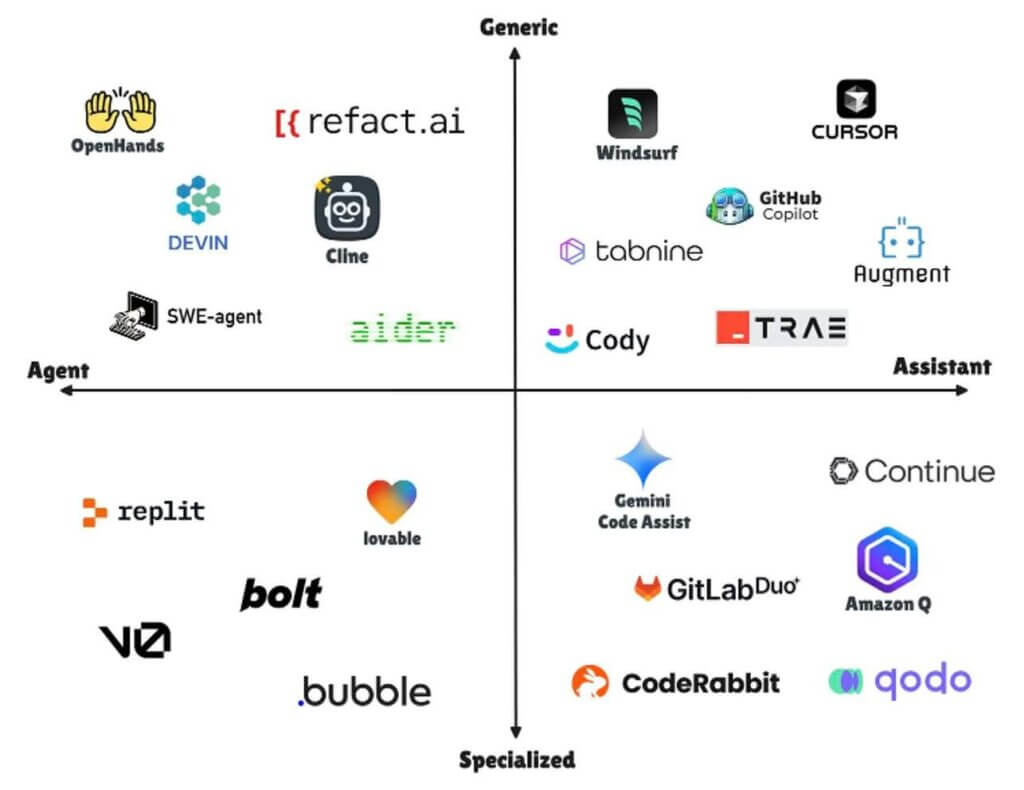
The Landscape Has Split Into Two Camps
Before diving into specific tools, it's worth understanding the two fundamentally different approaches that have emerged:
Prompt-to-app platforms are browser-based tools where you describe what you want and get a working application — frontend, backend, database, deployment — without touching code. Think Lovable, Bolt.new, Replit, Base44, and Emergent. These are designed for founders, product managers, and anyone who wants to go from idea to live app through conversation.
AI-powered code editors are tools built for developers who write code but want AI handling the heavy lifting — multi-file edits, debugging, architecture decisions, test generation. Think Cursor, Windsurf, and Claude Code. These assume you have a codebase and want to move faster inside it.
Both camps are useful. The right choice depends on where you are in the build cycle and how much control you need.
The Tools That Are Actually Trending
Lovable — The Design-First Builder
Lovable has positioned itself as the vibe coding tool for people who care about how things look. You describe an app in natural language, and it generates a full-stack application with a React frontend, Supabase backend, and genuinely polished UI. It's not just functional — the output actually looks like something you'd ship.
What makes it stand out: The visual quality of generated apps is noticeably ahead of most competitors. It also includes a visual editor for direct UI manipulation without going back to prompts, which is a huge workflow improvement. The team has raised over $200 million in funding and is aiming for $1 billion in annual revenue by late 2026.
Where it breaks: Complex backend logic, multi-step business workflows, and enterprise-grade integrations still push beyond what Lovable handles cleanly. It's exceptional for MVPs and customer-facing prototypes, less so for heavy internal tooling.
Best for: Founders validating ideas, product managers building clickable prototypes, and anyone who needs a polished front-end fast. Plans start at $25/month.
Cursor — The Developer's Workhorse
Cursor is a VS Code fork with deep AI integration — code generation, multi-file editing via Composer mode, and full codebase awareness. It doesn't build apps for you. It makes you dramatically faster at building them yourself.
What makes it stand out: It understands your entire project structure, not just the file you're looking at. The tab completion model is context-aware across your codebase, and Composer mode lets you make coordinated changes across multiple files from a single prompt. For developers who already know what they're building, Cursor removes an enormous amount of friction.
Where it breaks: Agent mode can introduce subtle bugs across large edits — the kind that pass a quick review but break things in production. It also assumes significant technical knowledge, so it's not a tool for non-developers.
Best for: Professional developers working on existing codebases who want AI-assisted speed without giving up architectural control. Free tier available, Pro at $20/month.
Claude Code — The Terminal-Native Agent
Claude Code has become the breakout tool of the past several months. It's Anthropic's agentic coding tool that runs directly in your terminal, reads your entire codebase, plans complex changes, writes and debugs code autonomously, and executes commands. As of early 2026, it has hit a $2.5 billion annualized run rate and roughly 4% of all public GitHub commits worldwide are now authored by Claude Code.
What makes it stand out: Unlike browser-based tools, Claude Code works where developers actually work — the terminal. It can chain over 20 independent tool calls without human intervention, meaning it can edit files, run tests, fix failures, and iterate autonomously. The recently launched Remote Control feature lets you start a task on your desktop and monitor it from your phone. And the new Code Review feature dispatches parallel agents to catch bugs before human reviewers see the code.
Where it breaks: It requires a Claude subscription (Pro at $20/month, Max at $100-200/month for full features). There's a real learning curve in crafting effective CLAUDE.md project files that give the agent enough context. And for truly critical business logic, you still need human oversight — autonomous doesn't mean infallible.
Best for: Developers who want an autonomous coding partner that lives in their terminal and can handle multi-step, multi-file tasks with minimal hand-holding. The power ceiling is the highest of any tool on this list.
Replit — The All-in-One Environment
Replit combines AI code generation with a complete cloud-based development environment. You can go from idea to deployed application without leaving the browser. Its AI Agent can plan and build entire applications autonomously, and built-in hosting eliminates deployment headaches.
What makes it stand out: The zero-setup experience is unmatched. No local environment, no dependency management, no deployment configuration. You describe, it builds, it deploys. For education, hackathons, and rapid validation, the speed is remarkable. Plaid built a production SLA Dashboard using Replit, which speaks to its growing credibility for real workloads.
Where it breaks: Cloud-only means limited control over infrastructure. Performance-intensive applications hit platform ceilings. And the effort-based pricing model can lead to unexpected costs if you're not tracking usage carefully.
Best for: Founders who want end-to-end speed, educators, and teams that value collaboration over infrastructure control. Free tier available, Core at $25/month.
Bolt.new — The Speed Prototype Machine
Bolt.new by StackBlitz is built for one thing: getting a working prototype in front of you as fast as possible. Generation times can be as low as 15 seconds. It's less about building production applications and more about rapid experimentation — testing ideas, exploring UI patterns, and validating concepts before committing to a full build.
What makes it stand out: Raw speed. For throwaway prototypes and quick design explorations, nothing in the market matches its iteration velocity.
Where it breaks: The output generally needs significant cleanup before it's production-ready. Backend capabilities are limited, and complex functionality often requires connecting external APIs that add cost and complexity. Several real-world tests show inconsistent results for anything beyond simple UI prototyping.
Best for: Designers and developers who need to test ideas quickly. Not recommended as a path to production without substantial rework.
v0 by Vercel — The Frontend Specialist
Created by the team behind Next.js, v0 has evolved from a UI component generator into a serious frontend development platform. It generates production-quality React components with clean code and built-in security — the platform has blocked over 100,000 insecure deployments since launch.
What makes it stand out: The code quality is genuinely production-grade for frontend work. It uses shadcn/ui best practices, generates clean TypeScript, and the security layer addresses one of vibe coding's biggest criticisms — that AI-generated code ships with vulnerabilities. The new Design Mode visual editor and multi-step automation features are pushing it beyond simple component generation.
Where it breaks: It's frontend-focused. If you need full-stack with backend logic, database operations, and complex business workflows, v0 is only solving half your problem.
Best for: Frontend developers in the React and Next.js ecosystem who want to accelerate UI development with production-quality output. Free tier available.
Emergent — The Agent Team Approach
Emergent uses a coordinated team of specialized AI agents — each handling different aspects of the development process — to build full-stack web and mobile applications through conversation. Backed by Y Combinator with a $300 million valuation after a $70M Series B, it's one of the most heavily funded pure-play vibe coding platforms.
What makes it stand out: The multi-agent architecture produces more coherent full-stack output than single-model platforms. Each agent specializes in a different part of the stack, which means the frontend, backend, and database logic are more likely to work together correctly out of the box.
Where it breaks: Mobile app support is still maturing. The Pro plan at $200/month is significantly more expensive than competitors. And like all vibe coding tools, complex enterprise requirements still require manual refinement.
Best for: Teams that want production-ready full-stack applications and are willing to pay a premium for more reliable output. Free plan with 10 credits, Standard at $20/month.
Google Firebase Studio — The Cloud-Native Path
Google's Firebase Studio lets you describe an application and get a full-stack app built on Google Cloud infrastructure — with one-click deployment to Cloud Run. It's particularly interesting because your application is production-ready from a scaling perspective on day one.
What makes it stand out: The deployment story. Because it's built on Google Cloud, your vibe-coded application automatically gets production-grade infrastructure — auto-scaling, traffic management, and global CDN. For teams already in the Google ecosystem, the integration with Firebase, Firestore, and Cloud Functions makes the backend genuinely robust.
Where it breaks: You're firmly in the Google ecosystem, which is great if that's your stack and limiting if it's not. The AI generation quality for complex UIs is behind dedicated tools like Lovable and v0.
Best for: Teams already on Google Cloud who want a fast path from idea to deployed, scalable application.
The Honest Truth About Prototype to Production
Here's what most vibe coding content won't tell you: there is still a meaningful gap between a vibe-coded prototype and a production-ready application. The tools above are closing that gap rapidly, but it hasn't closed yet.
The prototypes that vibe coding produces in 2026 are dramatically better than what was possible even a year ago. They have real backends, real databases, real authentication. But production-ready means more than "it works in a demo." It means:
- Security hardening. AI-generated code can ship with vulnerabilities. v0's approach of blocking insecure deployments is the exception, not the rule.
- Error handling at scale. What happens when your payment API returns an unexpected error at 2 AM? Vibe-coded apps often lack the defensive coding patterns that experienced engineers build instinctively.
- Performance under load. A prototype that handles 50 concurrent users and a production system that handles 5,000 are architecturally different. Most vibe coding tools optimize for the former.
- Maintainability. Someone needs to understand the generated code well enough to debug it, extend it, and refactor it six months from now. If nobody on your team can read the codebase, you've created a maintenance liability.
The smartest approach I've seen — and what I practice myself — is using vibe coding tools for rapid validation and then bringing in engineering discipline for the production hardening phase. The tools handle the 0-to-1 brilliantly. The 1-to-production still benefits from human expertise.
What I'd Recommend Based on Where You Are
If you have an idea and zero code: Start with Lovable or Replit. Get a working prototype in front of users within days. Validate before you invest.
If you're a developer and want to move faster: Cursor for in-editor speed, Claude Code for autonomous multi-step tasks. Use both — they complement each other well.
If you need a polished frontend fast: v0 for component-level work, Lovable for full-page applications.
If you're building something you intend to scale: Start with any vibe coding tool for the prototype, but plan for a transition to a proper engineering workflow. The best approach combines AI-generated scaffolding with human-reviewed architecture, security audits, and performance testing.
If you want end-to-end with minimal intervention: Emergent or Replit offer the most complete prototype-to-deployment pipelines, though both still benefit from human review before going live with real users.
The Bottom Line
Vibe coding in 2026 isn't a gimmick anymore. These tools are raising serious money, shipping real products, and fundamentally changing who gets to build software. Claude Code alone accounts for roughly 4% of all GitHub commits. Lovable is gunning for a billion dollars in revenue. The infrastructure is maturing fast.
But the hype still outpaces the reality in one critical area: the path from prototype to production isn't fully automated yet. The tools get you to a working product faster than ever before. The last mile — security, scale, reliability, maintainability — still needs human judgment.
The developers who thrive in this landscape won't be the ones who resist vibe coding. They'll be the ones who use it to handle the 80% of work that's routine and focus their expertise on the 20% that actually requires it.
Build with AI. Ship with discipline. That's the formula.